Price Reduction: Monochrome Toners For Samsung and Xerox Printer

New Price Reduction Effective 1st – 31st May 2012

****Limited Stocks!

1) Samsung Compatible:

D104L / D104 (1.5K yield) :  $80 buy1 free1 ; $220 (buy3 free3)
D105L / D105 (2.5K yield) :  $80 buy1 free1;  $220 (buy3 free3)
D109                   (2K yield)    :  $80 buy1 free1; $220 (buy3 free3)
D209L / D209 (5K yield)    :  $100 buy1 free1; $250 (buy3 free3)

2) Xerox Compatible

WC3210/3220 (5K yield)  :  $100 buy1 free1; $250 (buy3 free3)

HP Ink 564 / 920 IC Chip Transfer

HP Compatible Ink Cartridge 564 / 920 XL Cartridges is available. (Updated 07 Apr 2012)

Check Chip Version: Flip behind the cartridge, to see the type of IC Chip your existing cartridge is using. If using the old type, it can be removed and transfered successfully. The instructions are below.

However, if your printer is using the NEW CHIP, the new design will cause the chip to be damaged during removal process. Contact us for spare chips such that you can have it fixed into the printer and use our compatible cartridges.


The cartridges comes with IC chip at the bottom of the cartridge, which compatible IC chip has not been developed yet.  Hence we will need to use back the old IC chip. The tranfering of the IC chip is very simple.
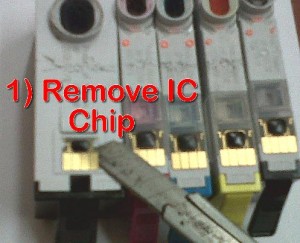
Step 1:  Remove the IC Chip by using a pen knife. Do not bend the chip, simply slide under the chip. The IC is attached to the ink cartridge by a double-side tape.
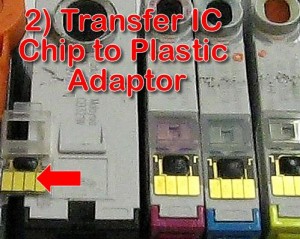
Step 2:  Transfer the IC Chip to the plastic adaptor provided. No glue is needed since the back of the IC chip already has residue double-side tape.
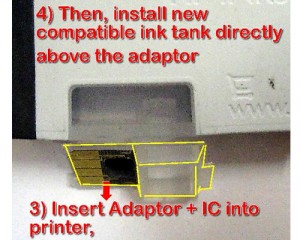
Step 3:  After the IC chip is stuck onto the plastic adaptor, it is now ready to be placed into the printer. This IC chip shall be placed into the printer permanently. The shape of the adaptor will fit into the slot in the printer like a LEGO brick.

Step 4:  Then install a new ORINK compatible ink cartidge into the printer. Printer is ready to print. When ink is used up, simply replace a new tank. IC Chip shall remain inside permanently.

Note:   The IC chip functions like a ID Chip such that the printer know that the right color cartridge is installed into the printer. All our ORINK branded ink cartridges comes with ink level sensor, such that when the ink is beginning to run out, the printer will know.


Notice the prism like plastic at the transparent portion of the ink tank. Ink is monitored based on light refraction, and when ink tank is empty, total internal refraction occurs, signalling to the printer all the ink is used up. In fact this is based on Canon think tank ink cartridges released 10 years ago. In our opinion, to have both IC chip and a physical prism ink sensor is redundant. 1 feature is sufficient. The extra development cost both the chip as well as the matching software could instead be returned to HP loyal customers through lower ink cartridge cost.

New Compatible Panasonic FAT92 & FAT411 Toner Launched

New Compatible Laser Toner for Panasonic Printer:

Toner KX-FAT92/92A/E/X
For Printers: KX-MB261/262/263/271/272/772/773/778/781/782/783/788

Toner KX-FAT411/411A/E/X
For Printers: KX-MB1900 // KX-MB2010 // KX-MB2025 // KX-MB2030

Yield: 2000pg / cartridge

Price: $40 (buy1 free1 promotion)

New Compatible Fuji Xerox C525A / C2090 FS Color Toner Launched

Color Laser Toner: for Printer Fuji Xerox DocuPrint C525A / C2090 FS

1x Black toner cartridge–Yield 4000 pages , 5% ,A4
1x Cyan toner cartridge–Yield 4000 pages , 5% ,A4
1x Megenta toner cartridge–Yield 4000 pages , 5% ,A4
1x Yellow toner cartridge–Yield 4000 pages , 5% ,A4

Price: $130 / set of 4pcs

New Compatible Fuji Xerox DocuPrint C2120 Launched

Color Laser Toner: for Printer Fuji Xerox DocuPrint C2120

1x Black toner cartridge–Yield 3000 pages , 5% ,A4
1x Cyan toner cartridge–Yield 3000 pages , 5% ,A4
1x Megenta toner cartridge–Yield 3000 pages , 5% ,A4
1x Yellow toner cartridge–Yield 3000 pages , 5% ,A4

Price: $100 / set of 4pcs

Toner for C1110 & C1190 also available.

Join Our Mailing List


Join Our Mailing List

We will keep our valued customers (you) updated about new products development, bargain printers, new launches, and most importantly, discounts for your printer supplies.

1) Simply email <<ADD ME>> to sg98448499@gmail.com
We will add you into our mailing list
2) Tell your friends about ORINK (SG)

The risk of “continuous ink supply” (CISS)

Most of the time , users failed to ask / and Sellers negligently withheld information.

Let’s look at the risk of CISS systems:

a) As with all refilling, DIY refills always damage printhead.
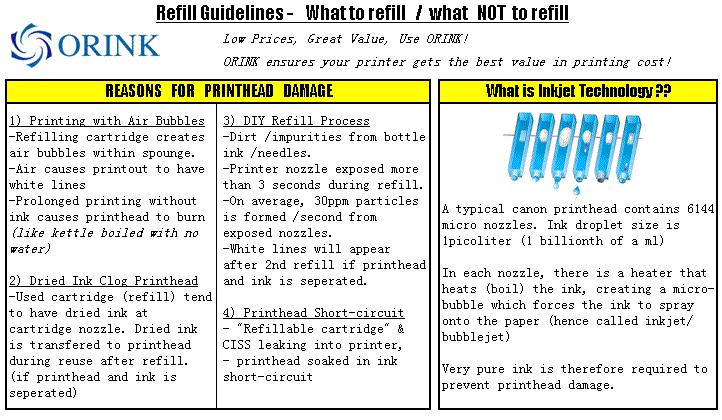
You can read more here the 4 main reasons of printhead damage caused by refilling due to dirt.

It need to be warned that such CISS and DIY ink refill system had caused a unprecedented record number of printer (printhead) damage. Printhead lifespan had been shortened considerably due to DIY ink refill proliferation.

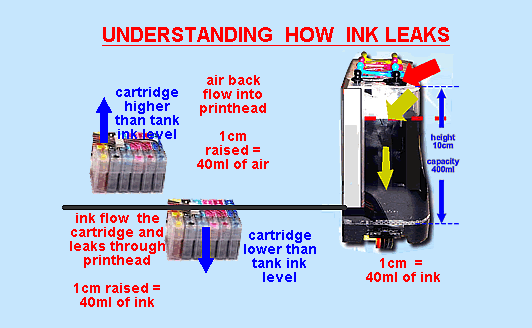
b) CISS ink tanks leaking non-stop: (above picture)

As the printer prints, the ink level will never be in perfect equilibrium.

When the pressure from the ink tank is higher, ink will leak through the cartridge. 1cm of height = 40ml of ink leak. Many CISS user find their printer soaked in a pool of ink the next morning.

c) CISS ink backflow into tank.  Printhead damage. (above picture)

When the cartridge is higher level that the ink tank, the air pressure in ink tank is lower, ink will backflow into the tank, and air enters from the printhead into the cartridge.  When the printer prints without any ink at the printhead, the printhead overheats and burn.

As there could never be perfect equilibrium, 1) immediately after setup, 2) when the printer is in motion (during printing),  3) following a refill procedure (the plugs are opened and then closed, some / sufficient amount of ink needs to leak out until negative pressure exist in the ink tank)

Are there savings using CISS?

Absolutely NOT. If you have purchased the right printer from the beginning. If you have chosen a Brother printer, you would have realized that Brother ink cartridges consist of disposable plastic container filled with ink. The compatible cartridge for Brother printers are approximately $5 which is cheaper than the bulk ink and labour cost charged by vendors to setup such a system.

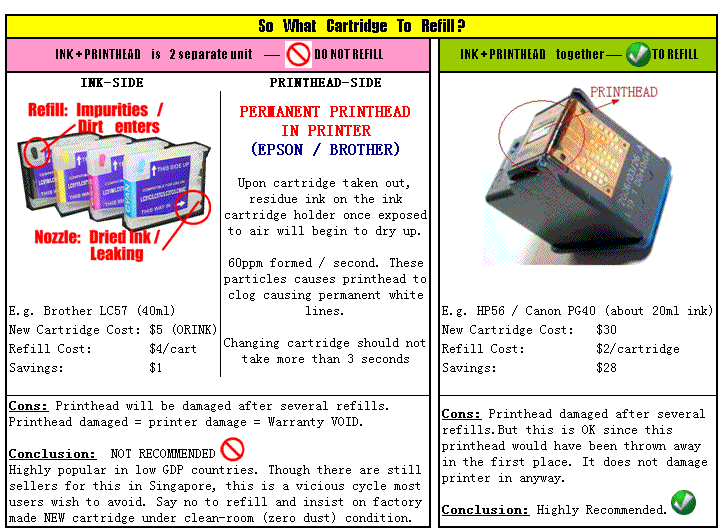
However, there are indeed savings when using refill kits when the right type of cartridge is refilled (i.e. those with printhead) read more here

So at what instance would CISS be useful?

Answer:
a) If you are a start-up running a printing house, but trying to save cost by printing on entry-level inkjet printer.
b) You print so much photos, several hundreds at each print job, so much so that it is a hassle to change cartridge.
c) And you can bear with occasional leaking.

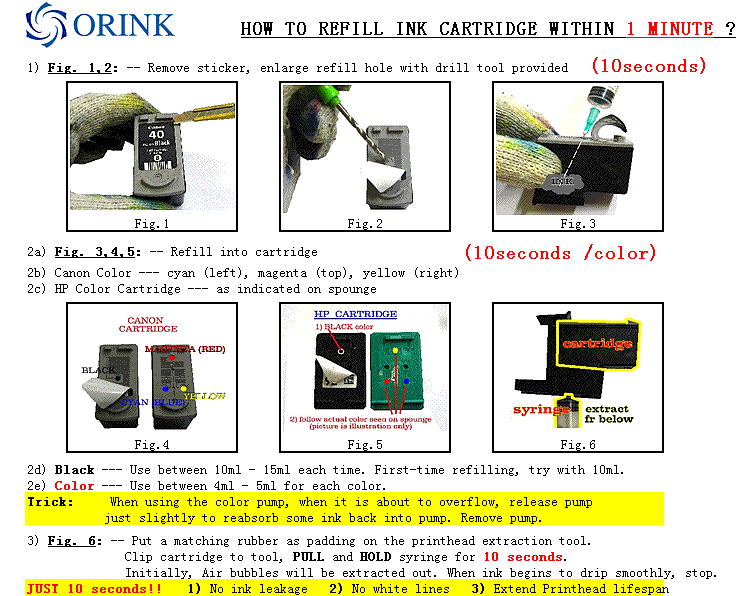
How to Refill HP & Canon ink cartridge in 60 seconds

It is very easy to refill. Our refill kit is designed to enable refilling within 60 seconds: Here’s an overview:
Step 1: Remove top sticker
Step 2: Enlarge refill hole for Canon (HP not required) ——– 5 seconds
Step 3: Refill 10ml Black ink into cartridge ———————- 10 seconds
Step 4: Extract away the air bubbles within the printhead compartment —— 10seconds

Risk of Toner Refills

Air Pollution…   Lung poisoning…  Need we say more?

Some toner cartridge can be easily refilled, some not.

However, even for easy to refill cartridges like Brother,  most of the time,  users do not know when to stop. They are only will to stop when components are damaged, and toners begin to leak into the printer.

Refilling should be carried out in the factory and with the proper equipment to curb pollution.

On the average,
5/10 DIY toner refillers spill toners at the first refilling attempt.
8/10 DIY refillers will use the cartridge until a lot of toner leaks into the printer.

Toner powders consist of charged particles, plastics, wax, and other chemicals. Inhaling or accidental consumption of toners is detrimental to health.

We have made some models very cheap as we aim to reduce and eventually eliminate DIY toner refills.

Check out our promotion

Risk of Inkjet Refills

To know what cartridge to refill, and what not to refill, we need to understand the following:

1) What is inkjet Technology
2) Reasons for Printhead Damage
3) What are the cartridge to Refill / and which are the ones not to Refill

Don’t fall victim. Many users ended up with Money Lost + Printer Damaged.